
New

Editing and removing line items in Shopify doesn't reflect in Shipstation

Related products:Stores, Carriers, and Other Integrations
  • October 5, 2021
  • 7 replies
  • 10 views

We recently had a customer request that we switch one item for another. Unfortunately, after editing their order in Shopify, we discovered that Shipstation doesn't remove the removed item – but simply adds in the new item, showing both items and their combined price.


Unfortunately, this could confuse our fulfillment team – causing the package to receive both items instead of just the one. I was told this was not supported by Shopify, and to submit a request here.


Here's a screenshot from our Shopify dashboard, shipstation has a partial screenshot below.
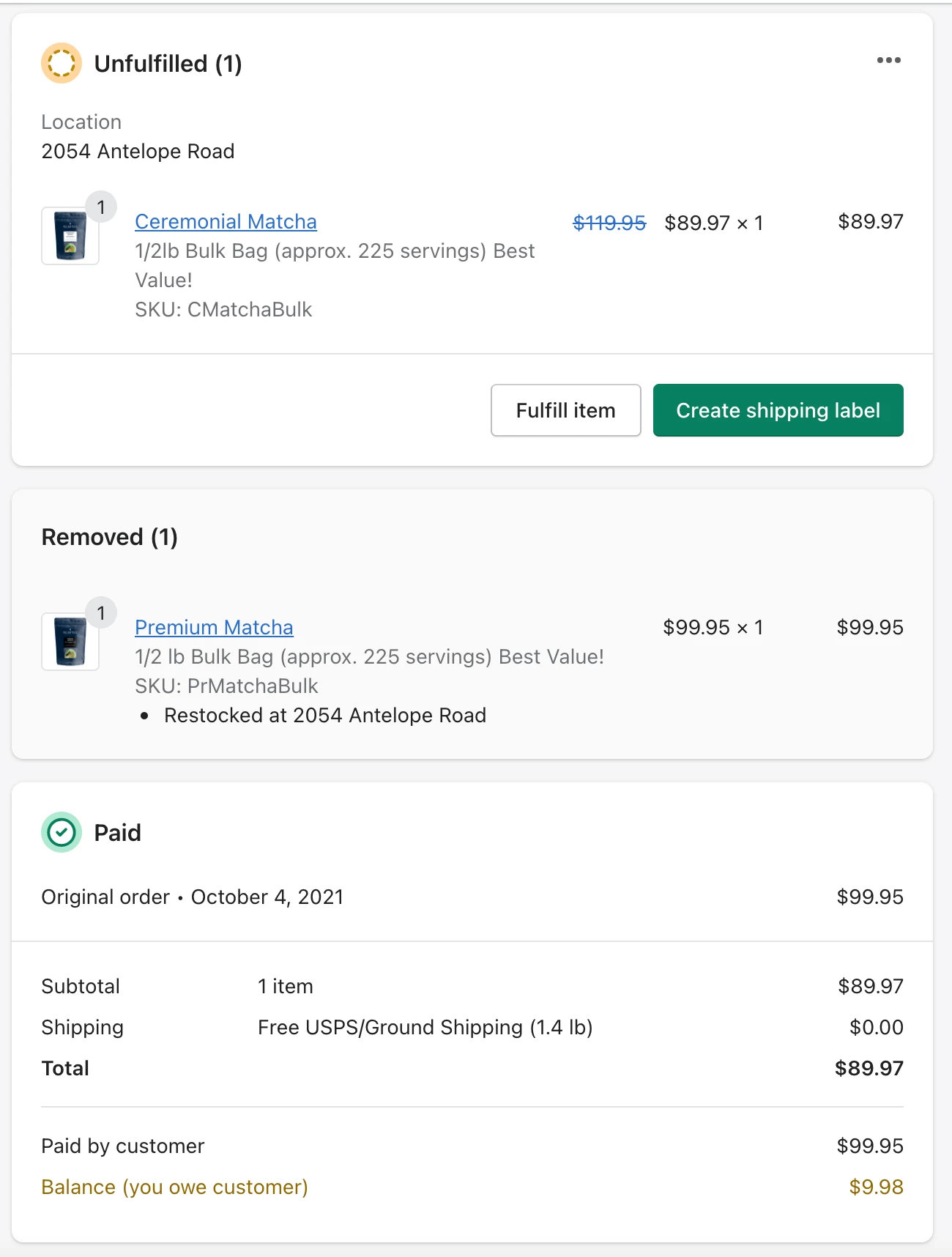
 

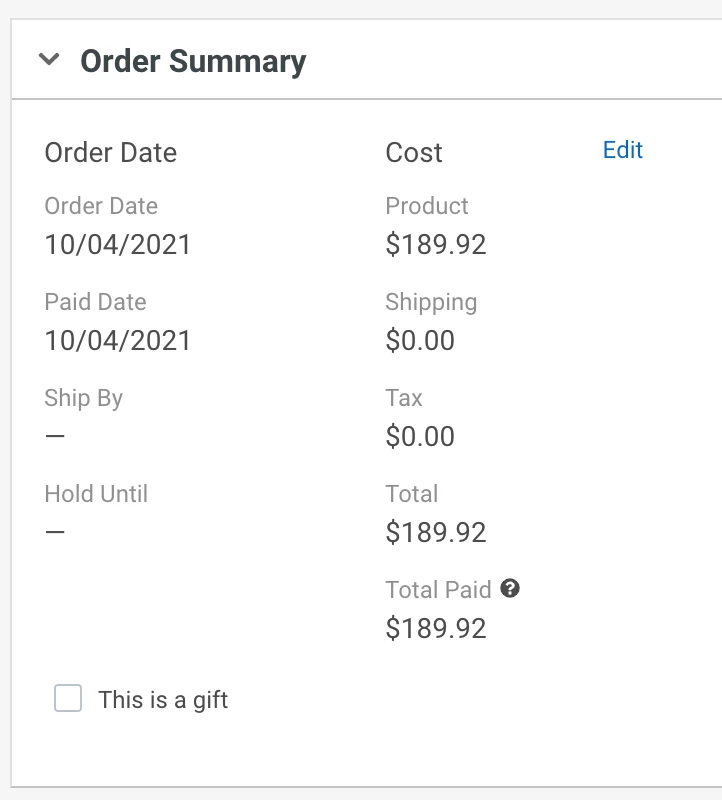
Since this posting, I've split the order and canceled the shipment with the removed item, but the original order was updated to include both products for a total of $189.92, instead of $89.97
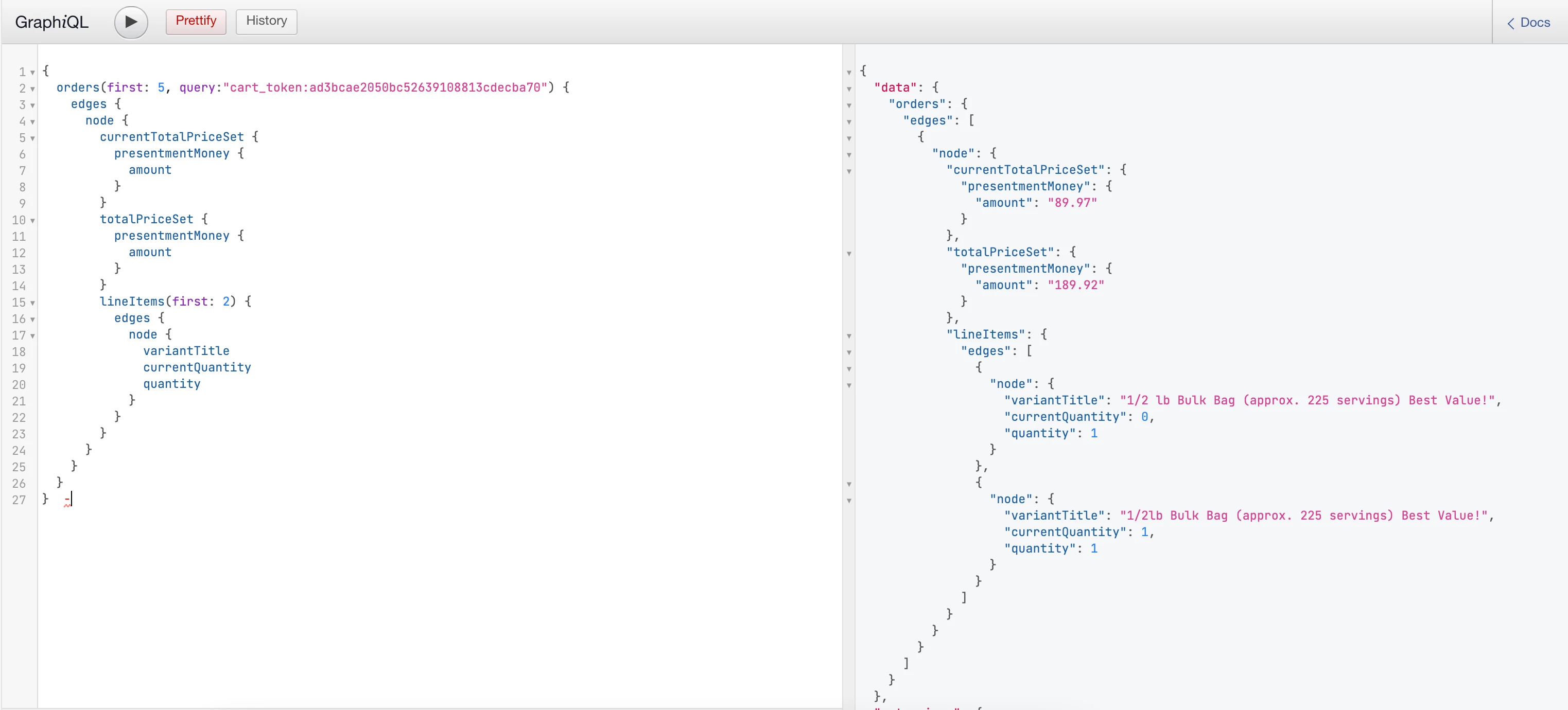
I did try running a query using graphql with this specific order, and saw that Shopify has two formats for querying order information in regards to line items and pricing. There's original values such as "quantity" and "totalPriceSet", and then there's current values which are the same, but append "current" to the name. For example, currentQuantity and currentTotalPriceSet. Below are screen shots of the queries with both values, suggesting it's possible to update information such as line item quantities and pricing (in the case of removed items).


Running current values shows the updated information, like a quantity of 0 for one matcha, and a quantity of 1 for another as well as current order price.


We'd love for items to be removed in shipstation if they're removed within Shopify, as it's likely this bug will cause multiple items to be shipped if not caught beforehand.

7 replies

  • November 9, 2021

We are in the same boat. It doesn't necessarily cause our fulfillment team major issues, but rather when the customer receives the "order shipped" email, it will state the incorrect # of products if we have removed and/or added any products since the order was originally placed. I don't think it's ever LESS than the real amount of products (which would be even worse), but it still makes a customer wonder if they ordered 2 or 3 items and the system tells them they have 4 or 5 products coming....


  • Author
  • December 10, 2021

Bumping this thread again. We've had a few of these this holiday season, and with the qty of one item (that has been removed) still remaining >1, it's rather confusing for our fulfillment team. The above solution ensures that the shipstation order accurately affects the order on Shopify.


tdye
  • October 20, 2022

Every company on Shopify is in this boat.


When items were removed and added to orders in our previous online store, Miva, they updated flawlessly in ShipStation.


So ShipStation why not provide this with Shopify or provide a workaround?


  • February 10, 2023

We are having major issues from this still. Our European customers are having to pay double VAT because the labels show the incorrect values. Shipstation customer service said there was nothing they could do. 


  • February 10, 2023

Here we are in 2023 and it's the same issue. However, it's a major problem. Our customers in Europe have to pay double the VAT due to the incorrect number of items on the label. Ship Station customer service said they can't do anything about it. 


  • July 27, 2023

We use SkuVault, an inventory manager to connect Shopify and Shipstation. We no longer have the ability to edit orders in Shipstation but if we can make a change of quantity,  or product in Shopify, hit the refresh store button and it'll make the change accordingly. The product that was removed will still show in shipstation but the quantity will Zero(0) 


  • September 23, 2024

It would be great to delete PRODUCT with the quantity is 0 from Shopify Orders!