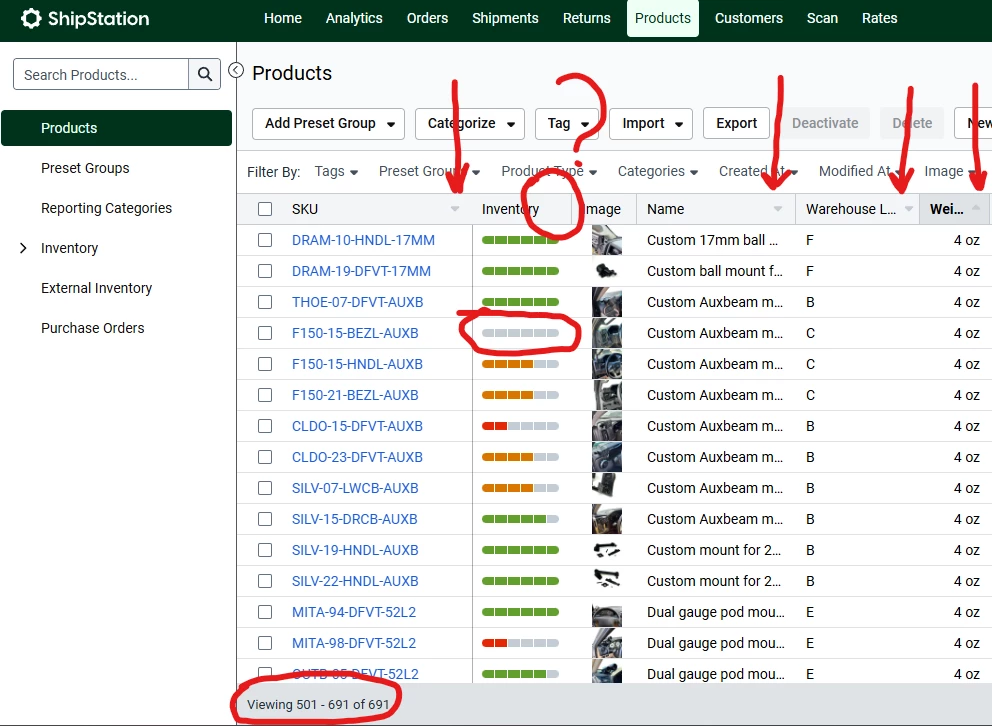
I recently spoke with a representative regarding a question about filtering inventory to display out-of-stock items. Unfortunately, I was informed that there is currently no way within the system to clearly identify when an item is completely out of stock. The interface only indicates when an item reaches the low inventory threshold. Once inventory reaches zero, the item disappears from the inventory interface entirely.
This creates a significant operational issue for our team. When a product reaches zero stock, we have no immediate visibility into the shortage. As a result, orders may continue to come in for items that we do not have available, and we may not realize the product is out of stock until much later. This has the potential to disrupt fulfillment and negatively impact customers.
Additionally, the system does not allow us to sort products by the On Hand Inventory column. The only available sorting options appear to be SKU, name, warehouse location, and weight (see below). If we were able to sort inventory from lowest to highest stock levels, it would provide at least a partial workaround for identifying products that are close to or at zero inventory.
At the moment, the only method available to us is to manually scroll through all 691 products in the Products tab and visually check the inventory bar for empty stock. We then have to write those items down manually. This process alone can take around 10 minutes each time we need to check inventory levels, and it is far from an efficient or reliable solution.
Our business is currently packing 40 or more orders per day, and it is critical that we have clear visibility into which items are out of stock. Being unable to quickly identify zero inventory items creates a serious operational risk.
If there is any workaround available, or if there are plans to implement the ability to filter or sort by inventory quantity, it would be extremely helpful for our workflow.
Thank you for your time and consideration.