Completed

Use "Deliver By" Date as Criteria in Rate Shopper

Related products:Stores, Carriers, and Other Integrations
  • October 4, 2024
  • 16 replies
  • 9 views

There needs to be more criteria options when creating rules for the Rate Shopper. The most important for us would be to have the rule look at a "Deliver By" date on an order and select the cheapest option that will make it to the customer by the deliver-by date.

An even better option is to say, if there are x days between the ship-by and deliver-by date, select this service/rate shopper rule, which could be executed through the automation rules. 

16 replies

CaraAdmin
  • Community Manager
  • October 9, 2024

Hello, @ShagTools!


Great news! The feature to use the deliver-by date directly is currently in internal testing and will roll out in the next couple of months. Stay tuned!


Happy Shipping!


-Cara


I would love for this feature to launch. Sometimes when a customer orders on a platform that has 1 day delivery and the delivery date is set out two days, I can get the order out on the order date and save a few bucks by using a 2 day service instead.

This will save my business a lot of money! Please launch this feature


CaraAdmin
  • Community Manager
  • March 10, 2025

Hello, @belmontleatherc!


Thank you for inquiring about this feature request! I've contacted our developers to check for updates, and I’ll share any new information as soon as I have it.


Happy Shipping!


-Cara


jukosikamoto
  • Employee
  • April 17, 2025

Hi @CaraAdmin 

This is very crucial. Can you please update us.


jukosikamoto
  • Employee
  • April 17, 2025

Hi

@CaraAdmin 

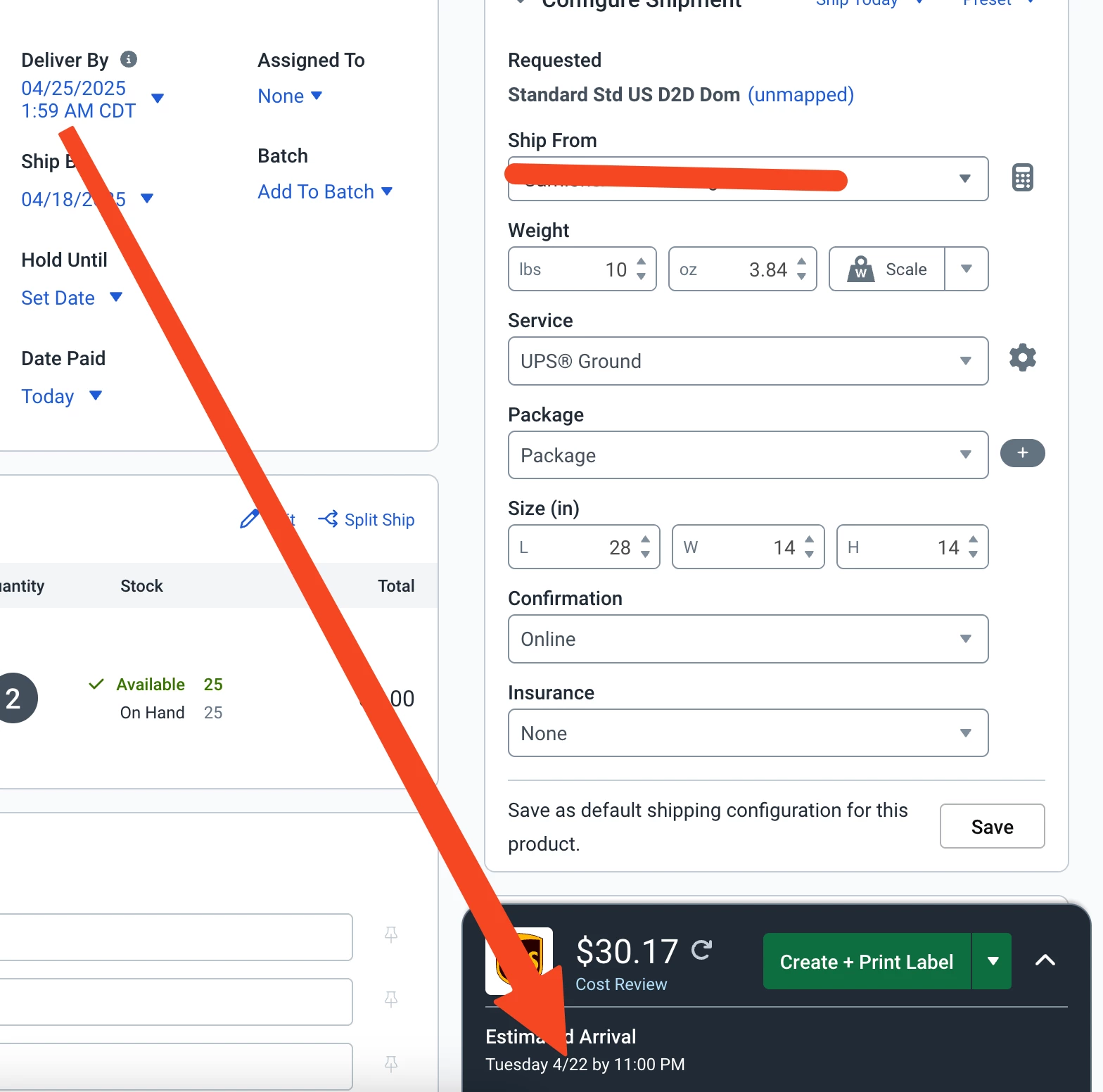
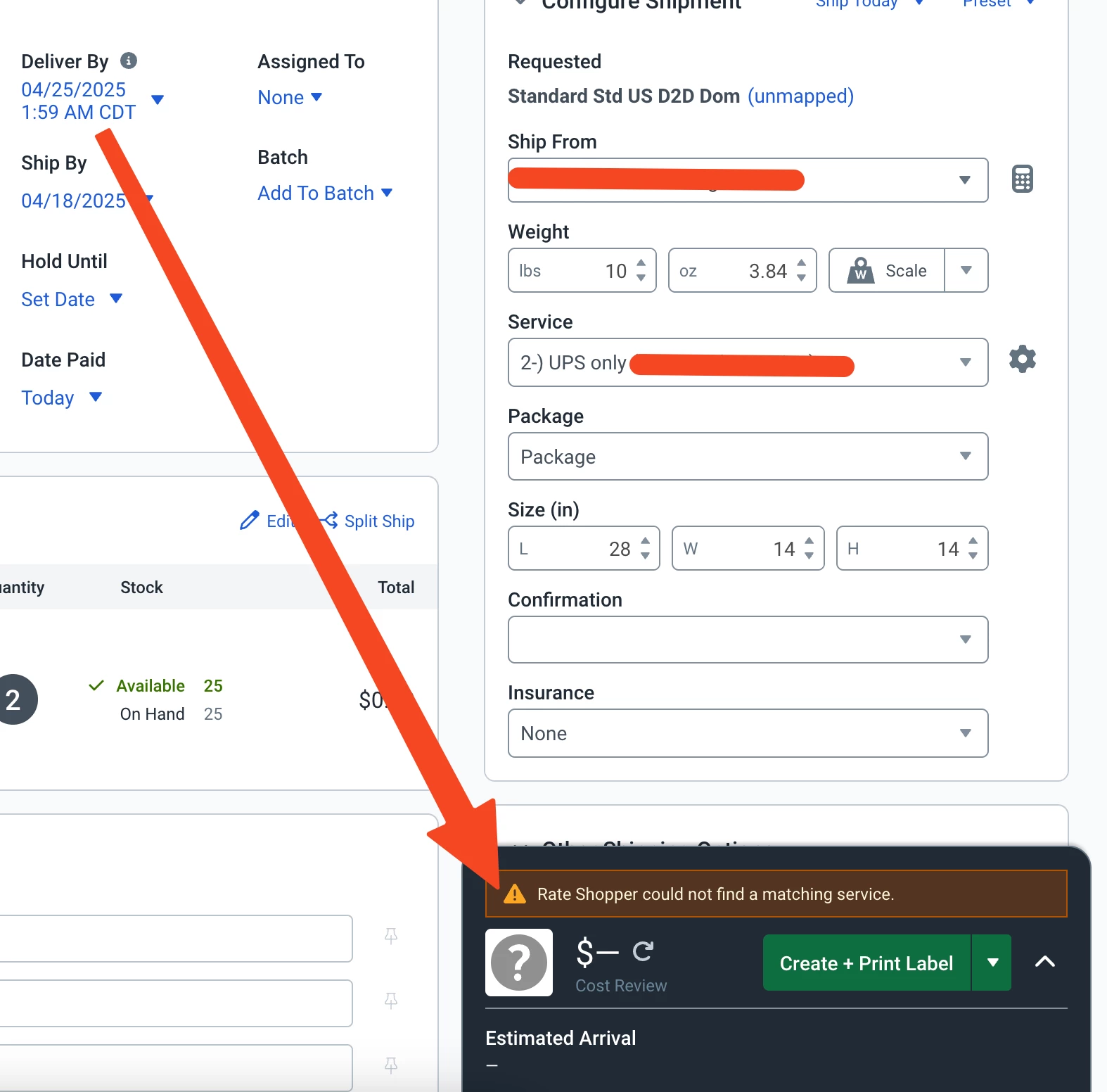
Even though we can deliver it eaerlier than the deliver-by date, the rate shopper says "Rate Shopper could not find a matching service." 

Please see the pictures below.


Thanks


CaraAdmin
  • Community Manager
  • April 22, 2025

Hello @jukosikamoto!


Thank you for contacting us! The error you're seeing indicates that a compatible shipping service is not available for this particular order.


After consulting with our support team, we recommend expanding your service options beyond just ground shipping. You can also use the Rate Browser or Rate Calculator to explore available services for this order.


Let us know if you need any help navigating those tools—we’re happy to assist!


Happy Shipping!


-Cara


jukosikamoto
  • Employee
  • April 24, 2025

@CaraAdmin 

How is expanding the service options going to solve the problem, if there is no problem when manually UPS is chosen but there is a problem when it is given to rateshopper?


CaraAdmin
  • Community Manager
  • May 8, 2025

Hello @ShagTools!


Exciting news! We've just rolled out Automated Rate Shopper, which gives merchants more control and flexibility. You can now use the Delivery By Date on each order to automatically select the cheapest shipping label to get the package to your customer on time! 

This builds on our existing Transit Time feature, making it even easier to meet delivery promises without overspending—think of it an easy button for smarter, stress-free shipping!

Getting started is simple: when creating or editing a Rate Shopper rule, just set the Transit Time dropdown to "Use Delivery By Date.

Check out our updated Help Docs for all the details!


Happy Shipping!


jukosikamoto

@CaraAdmin 
Help Docs link is broken. Can you please fix it.


CaraAdmin
  • Community Manager
  • May 9, 2025

Hello @jukosikamoto!


Thank you for letting me know the Help Center link wasn’t working. I’ve attached the document here for you. I appreciate your patience!


Please feel free to reach out if you need anything else!


-Cara


jukosikamoto

CaraAdmin
  • Community Manager
  • May 9, 2025

Hello @jukosikamoto!


Thank you for reaching out! I'm working on getting an experienced support agent in touch today. Our support team must thoroughly investigate this issue to determine if it requires escalation to our development team.

I apologize for not being able to provide a direct resolution myself—it looks like this one will need some deeper research.

Thank you so much for your patience—I genuinely appreciate it!


Happy Shipping!


-Cara


CaraAdmin
  • Community Manager
  • June 11, 2025

Hello @ShagTools!

We have great news! Our Deliver By Date feature is now live. When a customer selects a desired delivery date, this feature automatically searches for the cheapest shipping option to get the package there on time. It’s designed to help you keep your delivery promises while taking the manual work out of rate shopping.

To enable this, click Create or Edit a Rate Shopper rule and set the Transit Time dropdown to "Use Delivery By Date."

We’ve also linked our Help Center article with more details on using Rate Shopper and selecting the lowest rate—check it out to get started! If you need further assistance, please feel free to contact support@shipstation.com

Happy Shipping!

-Cara


jukosikamoto

Deliver by date on Amazon and ShipStation does not match due to time zone, That is why "Deliver by" in Rate Shopper does not work properly.

I thought you fixed that.


CaraAdmin
  • Community Manager
  • June 12, 2025

Hello @jukosikamoto!


Thank you for bringing this to our attention. Our development team is actively working through some of the current issues related to the Deliver By Date functionality in the Rate Shopper feature.

We appreciate your patience as improvements are being made, and we’ll be sure to share any updates as they become available!


As soon as a resolution is found, I will update the community! 


Happy Shipping!


-Cara


  • Author
  • June 13, 2025

@jukosikamoto I'm glad you mentioned that it still doesn't work properly. For $150/month, that's a hefty price for this feature, glad I didn't bite the bullet to see if its working as intended yet. 

Its already frustrating that we have to remember that the amazon deliver-by date is actually the day before due to time zone differences while manually reviewing rates and transit times. This seems like a really simple fix, where all that has to be done is NOT convert the Amazon delivery time to the timezone on the Shipstation account, that way it doesn't start showing us a delivery date & timestamp of 2am.