Store ID changed from Int to GUID

  • Apr 19, 2021 6:18 PM UTC
  • 2 replies
  • 0 views

Hey all, it looks like Shipstation has switched the Store ID from being an integer to a GUID, at least from what I can see in the store setup area.

We set up manual stores for each of our integrations with our OMS and have previously used the ID that shows up when you edit the store. Now it shows a GUID and we aren't able to see the Integer for new integrations.

Using the GUID for our integration returns the following error from our OMS "HTTP_STATUS(400) :{"Message":"The request is invalid.","ModelState":{"apiOrder.advancedOptions.storeId":["Could not convert string to integer: XXXXXXXX-XXXX-XXXX-XXXX-XXXXXXXXXXXX. Path 'advancedOptions.storeId', line 1, position 1410."]}}

We've reached out to them to find a workaround but wanted to post something here in case anyone else was having a similar issue and had a workaround.

2 replies

SuperMgr-Sarah

Hello!


Thanks for being a part of our ShipStation Community!


I checked with our API support team and we did stop exposing the Store ID in the store setup URL. But there are two ways you can still get your Store ID. 


  1. Use the list stores call to get your store IDs and save the list for future reference. Here is the ShipStation API doc about the List Stores call for your reference.
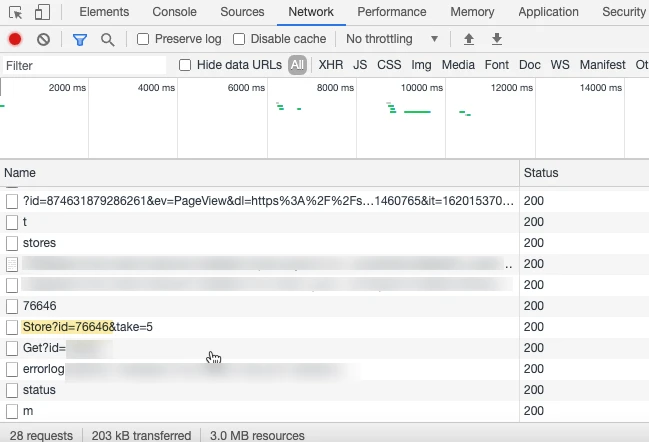
  2. Use your browser dev tools. 
     To do this:
    • From the store setup page, right-click in anywhere in the whitespace of the ShipStation UI
    • Select “inspect” or “inspect element” (browser dependent)
    • From the Inspect window, select the “Network” tab
    • In the ShipStation UI, click to edit the store details for the store in question
    • The store ID will present itself in the Inspector window


I hope this helps!


  • Dec 13, 2023 10:13 PM UTC

Hello,

Can you confirm that this fix, specifically using the dev tool, still works? @SuperMgr-Sarah 
I've gotten to the inspect -> network phase but when i click to edit a specific store the stored doesn't change. Im using chrome

Regards,

Matas