Under Review

Please fix the Currency Customs Declaration feature ASAP!!

Related products:Orders & Shipment Management
  • November 23, 2021
  • 17 replies
  • 4 views

Please fix the Currency Customs Declaration feature ASAP!!


There should be the option to change the currency. I Just spoke to support and they told me that the account is restricted to the currency it is set up in and cannot be changed. 

"Ok. At this time, your customs declarations reflect the currency your account is currently set to and there is no option to change that. I apologize for the disappointment this may cause."


This was never an issue with the previous platforms  


17 replies

  • December 8, 2021

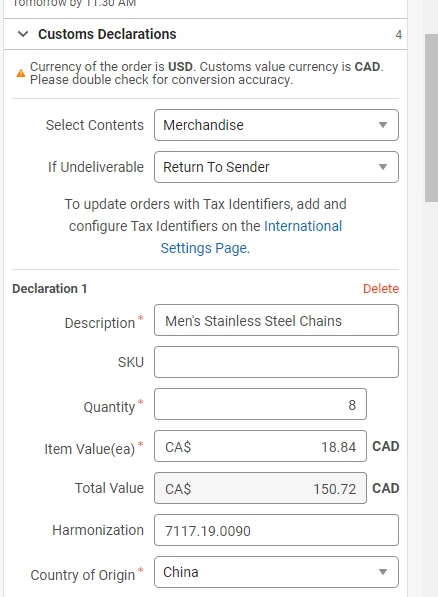
This has also become a huge issue for us and didn't know it would be until we started using ShipStation. We ship from Canada to USA and the declared value needs to be in USD.


Same problem here and customers are being pissed off. 


We are requesting this change for many years now... nothing is fixed yet... 


It wouldn't be that hard to let shipstation users change the displayed currency for the customs forms... 


  • October 27, 2022

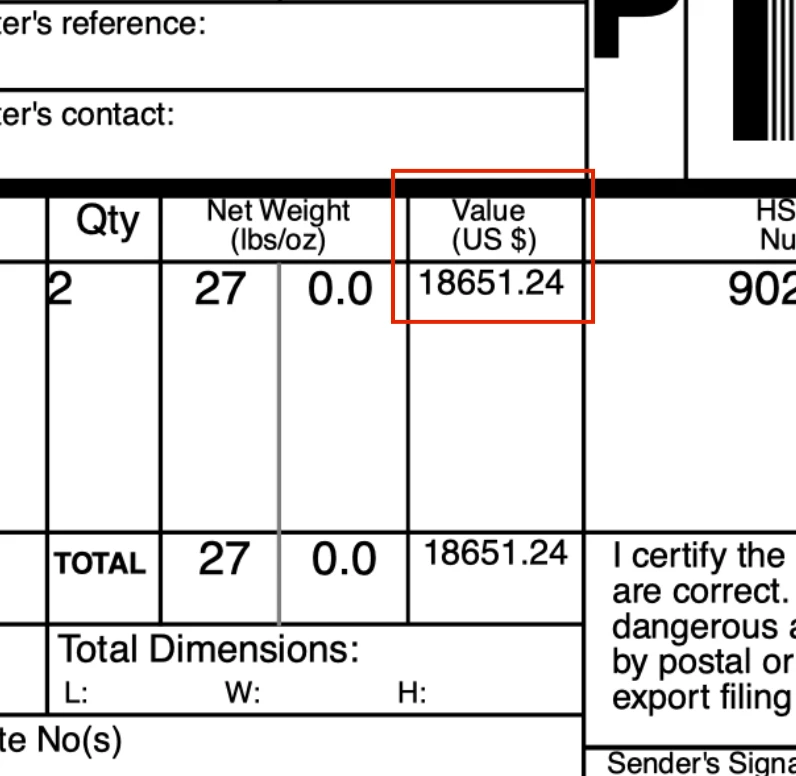
This is a major issue for us, particularly when we ship to Mexico.  The value of the shipment could be something like ~$900 US Dollars, but ShipStation uses the Mexican Peso and lists it as a value of ~$18,000 USD on the customs declaration.


This is because the item is sold on Amazon Mexico in Pesos, but ShipStation labels the value as USD on the customs declaration.  So the value looks to be $18,000 USD.  The value should either be $900 USD or 18,000 Mexican Pesos, but $18,000 US Dollars is definitely wrong.


This results in the Mexican customs rejecting the shipment, the shipment getting shipped back to us, time getting wasted, money getting wasted, and the customer getting understandably pissed.😤


We have written to ShipStation many times, they say "there is nothing we can do about it" (which I find hard to believe seeing as they wrote the software) and judging by that this forum thread was started a year ago, it looks like they don't really care to do anything about it either.  Come on ShipStation you can do better!  You are labeling the value of our shipment at 20 times what it should be in this case.  Please respond to this forum thread so we know you are paying attention to this obvious flaw 🙏 🙏 🙏


Here are some related posts about this same issue (from this forum) from as far back as 2013!!:

https://community.shipstation.com/t5/Orders-Shipment-Management/Currency-Issues-Customs-Form-Shipping-Value/idi-p/12839


https://community.shipstation.com/t5/Printing-Documents/Generating-customs-invoices-in-correct-currency/idi-p/3132


https://community.shipstation.com/t5/ShipStation-Features/Display-the-appropriate-currency-symbol-or-name-to-match-the/m-p/229

https://community.shipstation.com/t5/Orders-Shipment-Management/International-currency/idi-p/8788


  • March 11, 2023

Bumping this. It isn't difficult to simply add a dropdown menu with a list of international currencies to use on the customs form.


  • March 29, 2023

They don't seem to care about us. I'm looking for alternatives now, as I'm fed up waiting. Its worse now with IOSS as well, as the digital customs form shows the wrong amount! (as GBP, but they paid in EUR)


I just made another thread about this (see below). This thread is years old and the issue has not been addressed and is adding significant time and inefficiency to our order processing time by having to go order by order to update the item value to the correct currency number so as to not overpay on duties/taxes.

https://community.shipstation.com/t5/Orders-Shipment-Management/Order-automation-rules-should-allow-choice-of-currency-type-for/idi-p/22899#M6701


  • May 13, 2024

The workaround that I figured out for this is to add a value for the fields "Duties Paid" and "Postage Paid".  If there is no value for one or both, just enter 0 and this will calculate the shipping and allow you to process the order.


  • May 30, 2024

I also would love to see this addressed. I am based in the UK but sell to many other countries and this is causing me and my customers issues.


  • June 7, 2024

This is a very basic issue that has caused many of our customers customs clearance issues as well as taking valuble time from our dispatch team to manually convert the amounts ..  come on shipstation very simple recoding to use currency of order in the custom declaration.... or just put a currency converter function in... 3 years and nothing done is just poor... 


CaraAdmin
  • Community Manager
  • June 14, 2024

Hello @psommerv!


Thank you for your post and suggestion! At this time, ShipStation does not support currency conversions. I have attached an article on how ShipStation handles currency.


We appreciate your feedback!


Happy Shipping!


-Cara


  • August 27, 2024

This is a significant and costly issue. We have shipped a $70USD product to Japan and ended up with a $2,000USD customs bill because we forgot to manually update the customs document. We imported in Yen, but Shipstation converted the values back to USD for customs. Shipstation needs to be able to provide customs documents in the currency that we bring into the application.


This is EXTREMELY DIFFICULT for (our use case) any CANADIAN shipper sending to USA - our USD store populates USD numbers in the the CAD customs declaration.

Any high volume higher value Canadian shipper should NOT be using ShipStation while this issue exists.  With it, fussing with currency on every US shipment, we just can't "get SHIP done".

We don't want to make extreme contortions of exporting Shopify data, manipulating dollar values into CAD from a CSV, and uploading modified files several times a day to ShipStation, and after multiple conversations, that appears to be the ONLY current workaround.  

Clever coders, any comment?


CaraAdmin
  • Community Manager
  • October 2, 2024

Hello, @support97!


Great news! A fix has been implemented and is live as of today. We truly appreciate your patience while we worked on the resolution. The currency sign in the order value will now match what's displayed on the customs form.


If you have any feedback, we are happy to hear it! 


Have a wonderful day!


CaraAdmin
  • Community Manager
  • May 6, 2025
No text available

CaraAdmin
  • Community Manager
  • May 7, 2025
No text available

No fix has been implemented. This issue is stil a MASSIVE problem.


Especially for currencies like SEK that are bonkers compared to GBP


  • September 18, 2025

This needs to be fixed as a priority, after years of this major issue being ignored, we are switching to Shippo