An error occurred attempting to update orders: Could not refresh authorization credentials in timely

  • Aug 1, 2023 5:04 PM UTC
  • 20 replies
  • 2 views

shipping

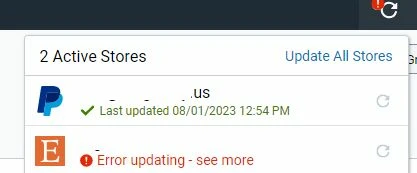
Trying to update ETSY

I get these errors

An error occurred attempting to update orders: Could not refresh authorization credentials in timely manner.

paypal updates but not etsy
20 replies

shipping
  • Author
  • Employee
  • Aug 1, 2023 5:14 PM UTC

it's working now


shipping
  • Author
  • Employee
  • Aug 2, 2023 1:45 PM UTC

It's not working this morning

An error occurred attempting to update orders: Could not refresh authorization credentials in timely manner.


shipping
  • Author
  • Employee
  • Aug 2, 2023 2:04 PM UTC

now it's working


  • Employee
  • Aug 3, 2023 6:04 PM UTC

I get these temporary update errors too, which is frustrating. It could be Shipstation's servers, or the store's. Manually refreshing after waiting a few hours usually fixes it.

What is a major problem to me is that Shipstation just permanently turns off auto-updates when this happens and doesn't notify you. (The only way to know is see that tiny exclamation point in the corner.)

I'm trying to get shipstation to be aware of this and fix this. There's no reason it should turn off auto-updates, and it should clearly notify you if there is a store connection error.

Please thumbs up on this suggestion to hopefully get some awareness so Ship station takes notice: https://community.shipstation.com/t5/ShipStation-Features/Suggestion-DON-T-disable-auto-ORDER-IMPORTING-if-an-update-fails/m-p/20373#M4003


I've experienced this issue sporadically since Tuesday 8/1.  Very annoying!


Not working agian....same issue as this

"An error occurred attempting to update orders:Could not refresh authorization credentials in timely manner."

How can this shit continue to happen


  • Sep 9, 2024 4:28 PM UTC

It seems like every week there is a new issue with shipstation! Someone needs to be hired to work on improving servers across the board. this makes all of our businesses look silly. 


  • Sep 9, 2024 4:38 PM UTC

hi I am having this same issue? when will this be resolved, I have over 80 orders to ship out today that are seasonal-specific 


sam_d_777
  • Employee
  • Sep 9, 2024 4:39 PM UTC

Same issue this morning. Incredibly disruptive having shipping not being able to work on a Monday morning.


LabAlley
  • Sep 9, 2024 5:20 PM UTC

  • Sep 9, 2024 5:27 PM UTC

same issue, have 100+ orders that cannot ship out... also several more that I cannot even import from our stores


  • Sep 9, 2024 5:27 PM UTC

I'm having this issue too. How is everyone else handling their monday shipments? 


A generic "thank you for your patience" is pretty ignorant when there is hundreds of packages missing shipping deadlines...any sort of eta would be helpful so working businesses could tell if they had to change provider to work around whatever issue Shipstation is having...


  • Sep 9, 2024 5:29 PM UTC

Same problem for over an hour. Will this be days again like last month? 

The contact us page is just a 404 error right now.😁  "We can't find the page you were looking for". At least they are honest.

Good thing we have this forum. Like many people have mentioned, Why not hire a team to go through this forum and resolve some of the issues?? Some have been sitting for YEARS! I shouldn't need to list them off, that is what this fancy community forum is for! There is an existing thread for every single issue I have with ShipStation, many are getting very old. Sometimes even marked resolved when they really are not... Please listen to us.


sam17
  • Employee
  • Sep 9, 2024 5:36 PM UTC

for us, we went into UPS carrier settings and re-connected (Authorized) and it started working again.  Funny, we shipped several packages then the error.  No problem (so far) since the re-authorization.  


jardon1
  • Employee
  • Sep 9, 2024 5:37 PM UTC

Yay more issues. guess what? Amazon doesn't care if shipstation isn't working, they still expect you to send orders. Fix your shzt 


Hey everyone. One of my clients was having a similar problem but this seemed to fix it:

i went to shipping > carriers > toggled on and off on ups > your carrier accounts > carrier settings > save


Yep, had to reauthorize UPS and then manually add funds to shipstation or it wouldnt go through...got first label bought and printed tho...


  • Sep 13, 2024 4:15 PM UTC

I'm now having the same issue. Four out of five connections, one is shopify, two are amazon, one is etsy - but one other shopify is working.

 
"An error occurred attempting to update orders: Could not refresh authorization credentials in timely manner."

This is ridiculous - I'm using this "downtime" to look into alternatives! You've raised your rates while your service and customer service have tanked!


Why is this still happening: Could not refresh authorization credentials in timely manner.

 
Shipstation monthly fees keep going up and the service gets worse...