Solved

ChargeBack from 8 months ago

  • Aug 28, 2021 5:47 AM UTC
  • 2 replies
  • 0 views

I have had a paypal chargeback from 8 months ago. But I can no longer locate the shipment on Shipstation for proof of shipping. Any tips on how to access the shipping notification.


And secondly does this mean I need to start manually adding shipping to every paypal order on Paypal website to stop recurrence of this situation.


Help appreciated.

Geoff

Best answer by SportTime

Hi Geoff, 


You may have a tough time defending this chargeback due to the amount of time lapsed, but if you supply all the information available regarding order details you may have a good chance of winning the claim.


To find your shipment in shipstation, go to the Shipments tab, then use the filter option to create a custom date range for the needed dates you believe this order shipped. I've included an example screenshot for visual aid. 
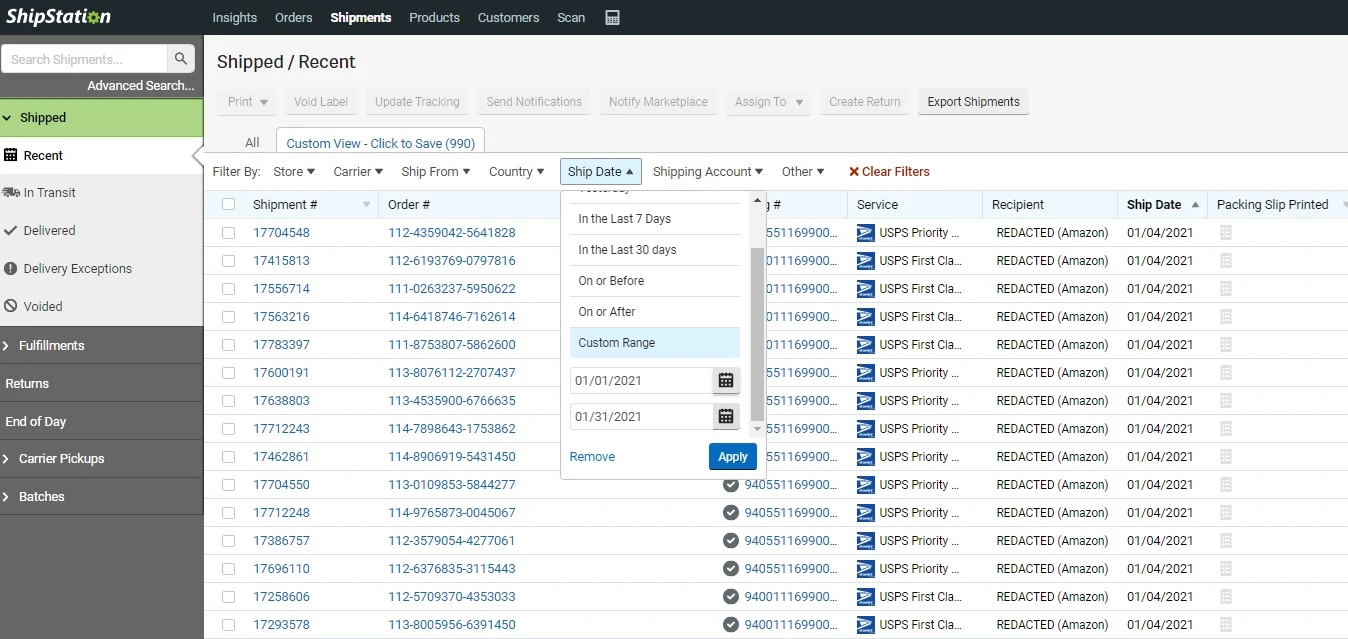


You may notice that our customer information is now missing; Amazon removes customer information after 90 days, leaving us with only the tracking number and order number. Unfortunately, most carriers reuse tracking numbers after 120 days, so you may not be able to confirm delivery with the saved information. If the customer information is now missing, you can download a copy of the shipping label to confirm the customer's name and address. 


As for saving your order details in PayPal, I'm afraid I don't have any advice for you. What selling platform are you using? 

View original
This topic has been closed for replies.

2 replies

  • Answer
  • Aug 30, 2021 6:42 PM UTC

Hi Geoff, 


You may have a tough time defending this chargeback due to the amount of time lapsed, but if you supply all the information available regarding order details you may have a good chance of winning the claim.


To find your shipment in shipstation, go to the Shipments tab, then use the filter option to create a custom date range for the needed dates you believe this order shipped. I've included an example screenshot for visual aid. 


You may notice that our customer information is now missing; Amazon removes customer information after 90 days, leaving us with only the tracking number and order number. Unfortunately, most carriers reuse tracking numbers after 120 days, so you may not be able to confirm delivery with the saved information. If the customer information is now missing, you can download a copy of the shipping label to confirm the customer's name and address. 


As for saving your order details in PayPal, I'm afraid I don't have any advice for you. What selling platform are you using? 


Manager-Erin

Hello Geoff, 


Thanks for being a part of our community and for your question.


First off, I am sorry to hear that you are dealing with a chargeback situation that can be stressful. Secondly, I agree with @SportTime's comment here, it is right on the mark.  You can try to pull it up in your shipments grid by changing the date filters or you can utilize our advanced search to find this order as well. I have put a resource about the advanced search below. 


View Search and Sort Orders: advanced search orders 


Finally, if you are still having trouble locating this shipment, you can reach out to our support team to see if they can pull up the order details for you from their tools on the back-end. The information that is there may be limited because of the order being from 8 months ago, but there should be something to pull up. 


-Erin: Your Friendly ShpStation Community  Manager