

Editing sent order emails

  • Aug 22, 2022 4:30 PM UTC
  • 4 replies
  • 0 views

IDScan

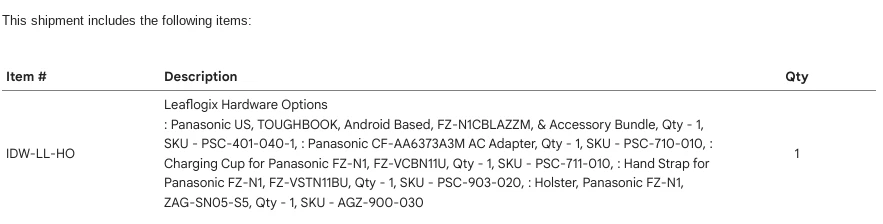
We are using the [Item List SHOWOPTIONS] tag to show order options detail on emails to customer when their order ships. We would like to have each option begin a new line. Notice in the attached photo it's confusing to read what options are being sent. Is there a way to have each : begin a new line?

4 replies

Moderator-Davis

Hello there @IDScan, 


It certainly may be possible to list those options on individual lines, however, I do not possess this knowledge as I am not an expert in html writing. Perhaps another community member IS that type of expert we need, and can share how they have made this adjustment to their packing slip. 


I know some users have had some success with freelance sites like "Fiverr" or similar for coding experts, if there are no such experts here currently.


IDScan
  • Author
  • Aug 31, 2022 2:44 PM UTC

Can you share where this can be done? We can do the coding, but do not know where to do it in Shipstation settings.


Moderator-Davis

@IDScan, 


Happy to point you in the right direction! 


Starting at Settings (gear icon in the top right) > Email Templates (under Customer Communication) > Triple dots under ACTION column for the template you'd like to make those changes to > Click the "code view" option to enter the html editor mode (Shown here in the red box). 


As a heads up, creating an additional template to use as a "sandbox template" of sorts prior to changing the template that is actively being used has helped me tremendously.


I hope this helps! 🙂 


IDScan
  • Author
  • Aug 31, 2022 4:11 PM UTC

We are familiar with the code view but the "field replacements" remain [item list SHOWOPTIONS] and are not editable.