
IOSS masked #

  • Sep 10, 2025 11:21 AM UTC
  • 1 reply
  • 0 views

greatbricklab1

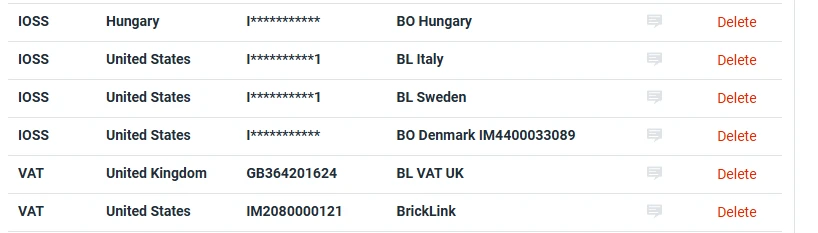
When adding an IOSS #, the system masks the # you add, making it difficult to verify at the point of applying it to an order.   The workaround is to add the same IOSS # to the nickname of the entry.  There is no reason I can think of to mark that # from our orders.   We added those manually to the system, and we also have total control over what is added.  Additionally, it is not consistent with VAT for all countries.   

Could you remove the masking of that IOSS?

Great Brick Lab
 

1 reply

CaraAdmin
  • Community Manager
  • Sep 17, 2025 3:09 PM UTC

Hello @greatbricklab1!

First, welcome to the Community! We're so glad you're here. This space is an excellent resource for finding answers, sharing feedback, and suggesting new product features—we hope you find it helpful and inspiring!

 Let’s see if we can gather more feedback from the community on the importance of this feature for the IOSS #. We truly appreciate your fantastic idea—your input is invaluable to our growth and improvement! In the meantime, let’s keep the momentum going. If you’d like to see this integration happen, give it a thumbs up so we can show the demand from our community.

Happy Shipping 

-Cara
