Have you experienced this before?
Consider a address imported from your store into ShipStation, where the customer intentionally puts their Unit # on BOTH LINES because they wanted to make sure the unit # doesn't get cut off:
ADDRESS LINE 1: 12345 N Longo Longoso Blvd #209
ADDRESS LINE 2: Unit 209
Undaunted by these attempts to help the package get delivered, ShipStation Address Validation REMOVES Address Line 2 (because, hey, the unit # is already part of line 1, right?) and authenticates the address as ONE LINE. But wait; there's more! The Validator also ADDS the additional descriptor of "UNIT", tipping the scale to the side of 'too many characters for one line'. Of course, the naive ShipStation user doesn't realize this. Why, you ask? Because sneaky ShipStation DISPLAYS as if it is pushed to the second line to cover its tracks:
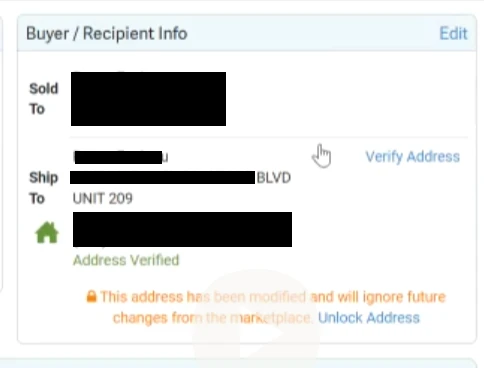
But you say, "well... the customer should have just put the unit number in address line 2. Surely had it only been there the validator would keep it there, right?" Wrong! It matters not if the original address had the unit # only on address line 2. ShipStation sheepishly follows the USPS validation format, cramming everything onto one line.
Even if the user notices this, edits the address to push the Unit to the second line, the Validator steps in to override, putting that unit and number on the first line again. (And yes I know you can, thankfully, unselect "auto correct").
But let's assume the Naive ShipStation user doesn't know that. NOW the address is over 30 characters and because we're using a FedEx label you know what that means, right? Right? Yup, it means the Unit # is going to lose a character on the FedEx label because ADDRESS 1 is too long. All the while lonely ADDRESS 2 is BLANK, robbed of its importance in the grand address schema.
And important it is, because now the shipping label has cut off the "9" and what once was #209 has now become "UNIT 20", which is a long ways away from #209 in the complex that package went to. But how does the naive shipper know this? Well, at least there is a warning on the label generation page...
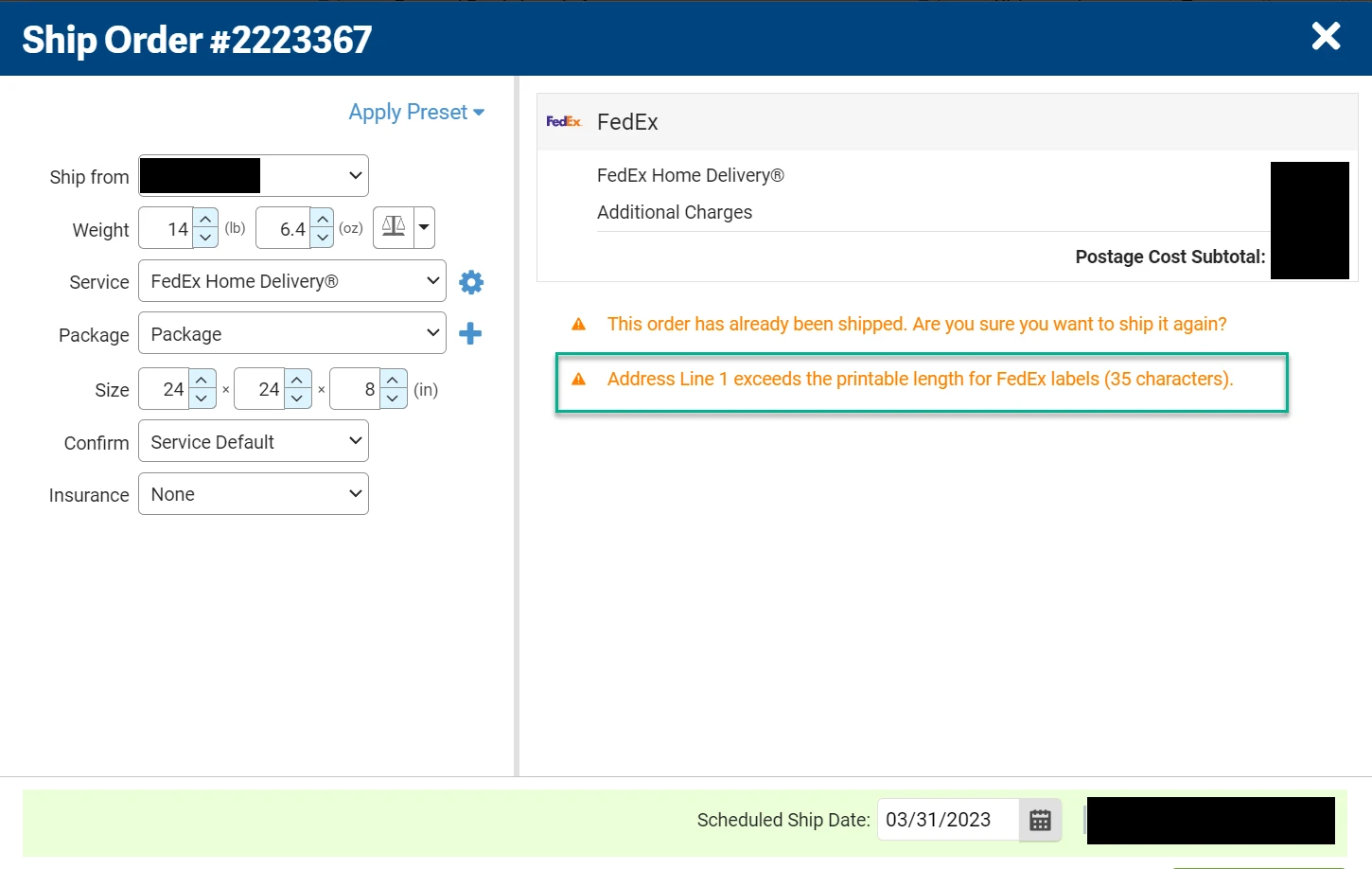
In our case, our Naive ShipStation team member missed the warning and the customer only received their package because of a nice neighbor, otherwise that would have been a $300 loss.
True, this is USPS's validation of the address and there is a warning before a label is created. Plus not all carriers have the same character limits for labels and how can ShipStation know what carrier is going to be used ahead of time? HOWEVER, the task of getting shipping labels correct is intrinsic to the service ShipStation provides and ShipStation should make the most effort here to ensure this that the Validation part of their platform operates as smoothly as possible.
This removal of Shipping Line 2 causes ANOTHER issue with a different address format that you might be familiar with:
ADDRESS LINE 1: PO BOX 1234
ADDRESS LINE 2: 1234 SOOL Street
In this case, the customer provides their physical address in case the carrier selected is FedEx / UPS. When the address comes into ShipStation and is validated, the second line is removed. Why is that an issue? Well, if your main carrier is UPS or FedEx, a PO Box means you need to ship it differently or contact the customer for a physical address. The Naive ShipStation Shipper might not even realize that the original address HAD THE PHYSICAL ADDRESS already and they might try to reach out to the customer or select a shipping method that isn't ideal.
We had been using ShipStation for YEARS before we caught on to this and realized that we should check what address the customer originally provided in our selling platform! It took even longer to realize that the address validation changes can be found at the very bottom of the Order Activity log. These two things are obscure and not found in documentation for new users (that I could find). Feel free to correct me here if I'm wrong.
I'm posting this because Support's suggestion of TURNING OFF Address Validation was unhelpful and would have resulted in more issues. They asked me to post this and make suggestions here.
So here are my brainstorm of ideas that might help:
1) Don't wrap the text in the order display screen to make it look like text is on the second address line if it's not OR have a some way to indicate that it is a continuation of Address Line 1 instead of a second line. Why not show that sucker in RED before the user gets to the label generation point?
2) Allow some additional configuration of the AUTO CORRECT parameters (ie don't automatically join address 1 / address 2 data), maybe even having the ability to turn off Validation based on individual customers like was suggested elsewhere
3) Build some AI functionality into address validation or something at the label pre-generation stage that offers a correction to solve the warning message (that address validation caused in the first place)?
If you've got another solution to suggest, please post!