Products import not working

  • May 8, 2021 8:51 PM UTC
  • 1 reply
  • 0 views

heathert73

I need to change the name of all 2700+ items I have in shipstation.  I have exported the items, made the changes in the csv file and saved the file.  When I try to import the file, I do receive the "product import complete" notice but none of the changes to the item names have been made.  In addition, I want to use the Description field in the products attributes area.  What field on the import template do I populate to add text to the Description field?

1 reply

SuperMgr-Sarah

Hello and thanks for posting to the community!


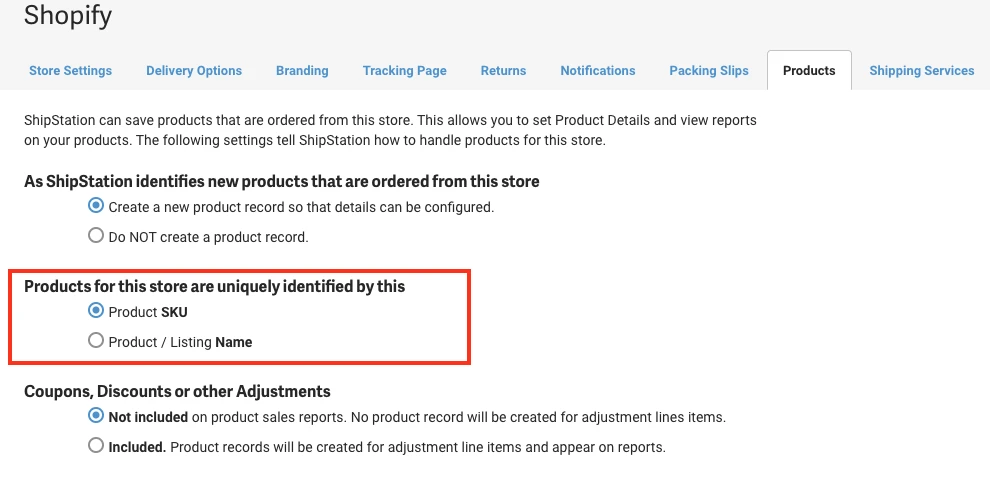
As long as you have your product settings set to uniquely identify by SKU, then the CSV import should update your product names. Identifying products by SKU is the default, so unless you changed that setting the import should work. 


Here is the setting in the Store settings. 

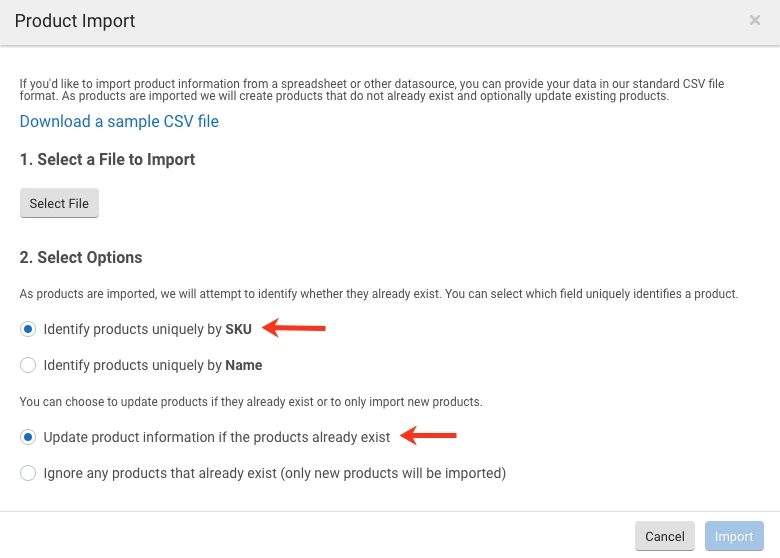
It's also an option when you upload your CSV file (there is also a setting in the CSV import pop-up that let's you decide whether to update existing products or not, but again, it is set for this by default): 


One last thing I can suggest is that once you see the "Import successful" message, refresh your browser window. If your product names are still not updated in the list, I would recommend contacting support so they can review the CSV file and do some testing with you.


As for the Description field in the product Attributes - that is currently not a field available for product CSV imports.


I hope this helps!