
Solved

Putting a tracking link into an email

  • Mar 16, 2022 6:25 PM UTC
  • 4 replies
  • 3 views

I want to set up an email template that would automatically send a message to customers when their order ships. But I want the tracking number to display, as just the tracking number, with it being a clickable link taking the recipient to the tracking site using that number. So, for example, 9405511202508974030647 – just the number displays, but it links to the USPS tracking site with that number.

Apparently the best ShipStation can do at this point is shown in this link from them: https://share.getcloudapp.com/p9u6jY89

Can we get this in a future version? Or is there a secret way to do this that someone knows about?

Best answer by beth

Hi Craig,

I think what you're looking to do is feasible (if I am understanding your question correctly).

What you'll want to do is

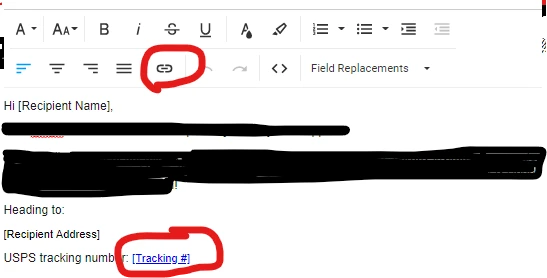
1) Within your custom email template, use the field replacement [Tracking#]. (Shipstation will automatically change that to a field replacement in your email to the numerical tracking number.)

2) Highlight the entire field replacement value, ie from bracket " [ " to bracket " ] "

3) Click the insert link option in the top bar above the editing field.

4) Enter the " [TrackingURL] " into the URL field.

5) Save!

What I do is use the field replacement [Carrier Name] [Tracking #] (with the inserted [Tracking URL] as explained). What this looks like on the front end is:

UPS 1544654318435488215 or USPS 215674616546884321 with the numbers being clickable. Depending on what your options are in the store setup, this link will bring the customer to the Branded Tracking page or the Carrier Tracking page. https://help.shipstation.com/hc/en-us/articles/360026157911#UUID-9e36521e-dd96-e1c6-9a2e-9a0e00a6afef

That will work! If you look at the default email confirmation template, this is how it is set up. I don't know why they don't make this information more available, but I just did it myself and it worked.

View original

4 replies

jeremy_S-and-S

Luckily this is VERY easy! If you are using the ShipStation email template, you just want to use [Tracking #] which will automatically add the number. Then you want to highlight from bracket to bracket and choose the link icon above. It will allow you to input that url.


  • Answer
  • Dec 2, 2022 10:19 PM UTC

Hi Craig,

I think what you're looking to do is feasible (if I am understanding your question correctly).

What you'll want to do is

1) Within your custom email template, use the field replacement [Tracking#]. (Shipstation will automatically change that to a field replacement in your email to the numerical tracking number.)

2) Highlight the entire field replacement value, ie from bracket " [ " to bracket " ] "

3) Click the insert link option in the top bar above the editing field.

4) Enter the " [TrackingURL] " into the URL field.

5) Save!

What I do is use the field replacement [Carrier Name] [Tracking #] (with the inserted [Tracking URL] as explained). What this looks like on the front end is:

UPS 1544654318435488215 or USPS 215674616546884321 with the numbers being clickable. Depending on what your options are in the store setup, this link will bring the customer to the Branded Tracking page or the Carrier Tracking page. https://help.shipstation.com/hc/en-us/articles/360026157911#UUID-9e36521e-dd96-e1c6-9a2e-9a0e00a6afef

That will work! If you look at the default email confirmation template, this is how it is set up. I don't know why they don't make this information more available, but I just did it myself and it worked.


  • Dec 5, 2022 5:42 PM UTC

Thanks!! Absolutely the same here.

This is worthy of an email blast to the entire customer list. Help documentation needs updating ASAP!


  • Dec 5, 2022 5:45 PM UTC

I actually ended up finding an alternative solution.

In the Templates section, simply "Copy Template" from the original, and then it creates a second version of the default with that LINK INTACT.

Then, edit everything you want around it, and voila...we're in business with a clickable Tracking link.