
We recently found ourselves needing to recreate the ShipStation Scan to View barcode for an integration with our third party warehouse. The ShipStation documentation provides very little information on the content of this barcode, so I'm sharing our findings here in the hope that it will benefit another user in the future.
Scannable Barcode Format
ShipStation expects the Code128Auto barcode format. In practice, the barcodes can always be encoded in the "B" Codeset - (ASCII 0-9, A-Z, a-z, and symbols)
Reference Link: https://en.wikipedia.org/wiki/Code_128
Font Link: https://fonts.google.com/specimen/Libre+Barcode+128
Building the Barcode
The contents of a ShipStation Scan to View barcode consist of 3 parts; Prefix, Content, and Suffix
| Prefix | Content | Suffix |
| The literal characters "^#^" | The ShipStation Order ID, encoded to hexidecimal format | The literal character "^" |
The Prefix, Content, and Suffix are then concatenated together and encoded in the Code128 barcode format.
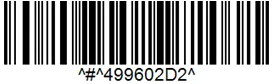
Example Barcode
ShipStation Order ID: 1234567890
Hex-encoded Order ID: 499602D2
| Prefix | Content | Suffix |
| ^#^ | 499602D2 | ^ |
Code-128 Image
Notes
The ShipStation Order ID is not the same as the ShipStation Order Number. It's a unique identifier accessible via the ShipStation API or viewable via the UI as the numerical string in the URL when viewing a ShipStation order.
A Code128 Barcode requires start, stop and checksum characters. These would typically be automatically generated by barcode encoding software, and as such are not detailed here.

