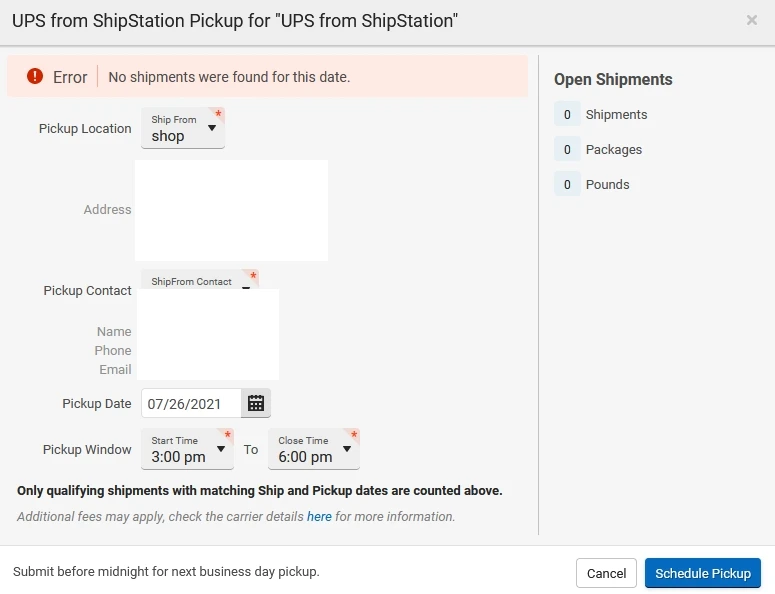
Trying to schedule UPS pickup "No shipments were found for this date."

  • Jul 26, 2021 12:37 PM UTC
  • 3 replies
  • 2 views

shipping

Trying to schedule UPS pickup "No shipments were found for this date."  I have 5 to be picked up.

Why am I getting this error?
3 replies

Moderator-Davis

Hey there @shipping! 


Thanks for bringing this to the community! 


When we see that shipments are not showing up during pick-up scheduling, the first things I like to check are: the ship date matches to the orders, the ship from location matches to the orders, and lastly that the carrier you are attempting to set that pick up with matches to the orders. 


I know these may seem like "well of course I checked that" type solutions, but i've seen it 1000 times so just want to make sure that every i is dotted and every t is crossed. 


If you double check each of these things, and are still unable to get those packages to show up, I would highly recommend reaching out to our Support Team via Chat so that we can look more directly into your account specifically to ensure there isn't any backend processes getting hung up preventing that scheduling action. 


I hope this helps my friend! 🙂 


  • Sep 5, 2024 7:54 PM UTC

so how is this going?

cause it's still now working.

also shipstation support said:

""To ensure that the shipments appear on the specified date you've chosen, the label creation date or Ship Date and the information within the shipment must match the details for scheduling a pickup. For instance, if you're scheduling a pickup for a shipment on 09/05/2024, the Ship Date on the label for that order must also be 09/05/2024. This shipment should appear on the "Open Shipments" when scheduling a pickup.""

why? who came up with this rule and what for? That's not how UPS works. Why such stupidity shipstation?

your customer wants to schedule the pick up on specific date,

just get it done for the customer no? What business is it of yours what date actual label is made?


  • Feb 12, 2025 12:20 AM UTC

Exactly