What does RESTORE button do?

  • May 27, 2022 9:55 PM UTC
  • 5 replies
  • 0 views

david_dean

I have an order that was marked as shipped that I need to move back to Awaiting Shipment.  I selected the order and clicked 'Restore'.  I'm not sure what this button did.  The original order is still marked as shipped, and it seems to have created an empty shipment connected to this order.  Is that the intended function?  How can I simply move the status back to Awaiting Shipment for the actual shipment, as I could in V2?  I do not want to create a new shipment, just restore the existing one.


BTW, I initially submitted the above to the support email address, as we are asked to do.  I received no response and a day later the case was marked as 'Solved'.  So I'll try again here 🙄

5 replies

pedalpcb
  • Employee
  • May 29, 2022 1:09 AM UTC

I don't understand it either.     


What happens when I need to reship an order to an international address that requires customs declarations?     How do I add any product information to this new shipment? 


The Restore button has always worked flawlessly, it didn't need "fixing" and now it seems basically useless?


david_dean
  • Author
  • Employee
  • May 31, 2022 3:19 PM UTC

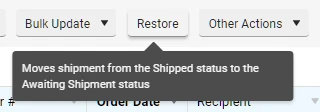
ShipStation support told me that RESTORE is meant to move a cancelled order back to awaiting shipment.  The system showed me the RESTORE button when I selected an order that was SHIPPED, not cancelled.  And the mouseover text when I hovered on the RESTORE button reads "Moves shipment from the Shipped status to the Awaiting Shipment status":

But it did not do that, it created a new, empty shipment attached to the original order.  Is that the intended behavior?  


I need a way to move a shipped order back to Awaiting Shipment.  Shipstation, please tell us how that can be done.


pedalpcb
  • Employee
  • May 31, 2022 3:27 PM UTC

I'd also like an explanation of how the RESTORE button is intended to be used.


I'm not sure why you would ever want to create an empty shipment based on an existing order.    Why would the contents of a reshipped order be any different from the original shipment?    It seems to me that RESTORING a shipment should return it to it's original state (products, weight, customs info, etc)


The newly created shipment has no product info or customs information attached and I don't see any way to add it.    That makes it completely unusable for international shipments.   


For domestic shipments I can just reprint the old packing slip, but for international shipments the tracking information wont match the newly created shipment so it will likely be rejected by customs.


Can we please get the old "RESTORE" functionality back?     Just return the status to Awaiting Shipment, that's always worked perfectly fine.


david_dean
  • Author
  • Employee
  • May 31, 2022 6:24 PM UTC

From support: "Orders that are manually marked as shipped are typically fulfilled outside of ShipStation which is why you have the ability to restore them into Awaiting Shipments."


Nope!  I can click RESTORE for any shipped order, regardless of whether it was fulfilled inside or outside ShipStation.  And it did not move it back to Awaiting Shipment.  And why would you add that arbitrary limitation?  If I need to move an order back to Awaiting Shipment, why would it matter how it was originally fulfilled?


ShipStation - again and again, it's not like we're asking you for complicated new features or to address some crazy one-off situations.  These are features that were part of V2 and worked as intended, and were removed or broken in V3, for no apparent reason.  


david_dean
  • Author
  • Employee
  • Jun 1, 2022 10:28 AM UTC

I've tried again to move an order from Shipped to Awaiting Shipment.  I have an international customer who had their shipment returned to sender, and now I need to reship to them.  This is EXACTLY what this function should do!  I just want to move this back to Awaiting Shipment, and ship it again!


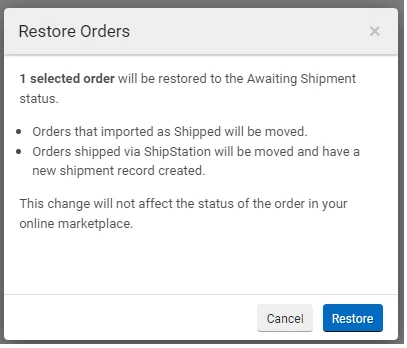
So I clicked RESTORE and got this message:


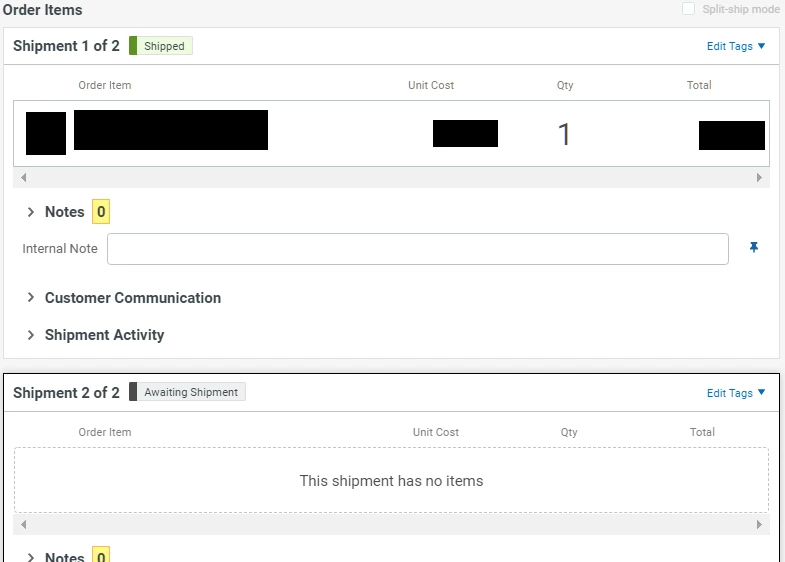
And what I got was this:

So the original order is still there and still marked as SHIPPED, and a new shipment was created but is empty.  I cannot move items from Shipment 1 to Shipment 2, and cannot add new items to Shipment 2. 


Please explain to me what the intended functionality of this is?